

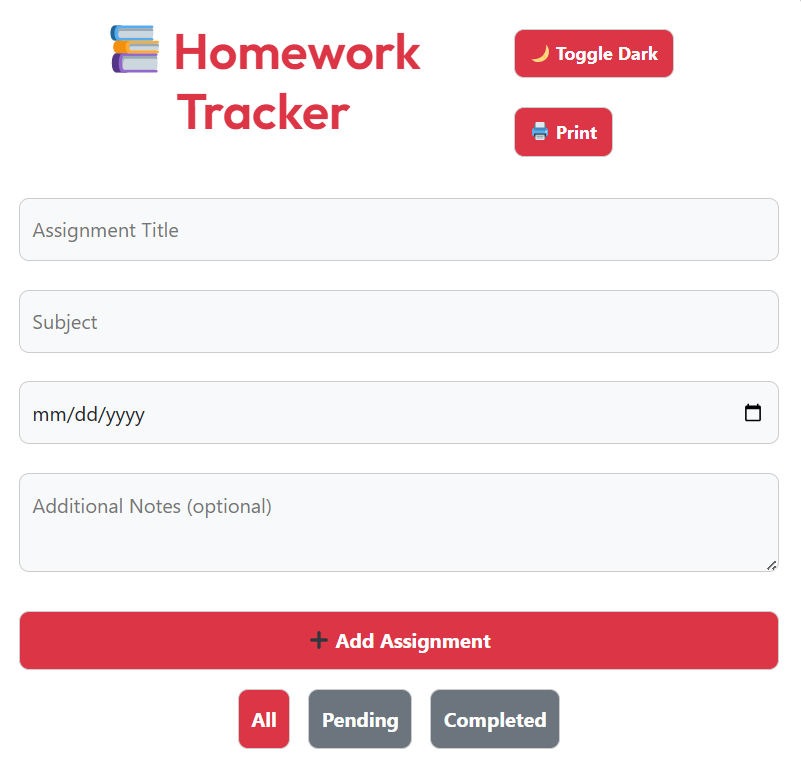
Homework Tracker
Progress Overview
Add New Homework
Your Homework
No homework added yet. Start by adding a new task!
📤 Share the Free Homework Tracker:
Homework Tracker
Never Miss a Deadline Again – Stay Organized with This Free Homework Tracker
Managing schoolwork can be stressful. Between classes, extracurriculars, and personal time, it's easy to forget an assignment or miss a due date. That's where a homework tracker comes in. This simple, powerful tool helps students of all ages stay on top of their assignments, reduce stress, and improve grades.
Our free homework tracker is designed for students who want to take control of their time. No downloads, no sign-ups, no ads. Just a clean, easy-to-use interface that lets you add tasks, set due dates, and track your progress—all in one place.
Why You Need a Homework Tracker
School life is busy. Whether you're in middle school, high school, or college, keeping track of multiple subjects and deadlines can feel overwhelming. A homework tracker helps you:
- See all your assignments in one place
- Prioritize urgent tasks
- Avoid last-minute cramming
- Build better study habits
- Feel more in control of your schedule
Studies show that students who use planners or digital trackers are more likely to complete assignments on time and perform better academically. This tool brings that benefit to your browser with zero effort.
Real-World Use Cases
1. High School Student Balancing Multiple Subjects
Imagine you're a 10th-grade student with math homework due tomorrow, a history essay due Friday, and a science lab report next week. Without a tracker, you might forget the lab report until it's too late. With this tool, you enter each task, set the due date, and assign a priority. The tracker highlights what's urgent and shows your progress—helping you plan your week wisely.
2. College Student Managing Long-Term Projects
College courses often include big projects that span weeks. A student working on a research paper can break it into smaller tasks—choose topic, find sources, write outline, draft sections—and track each step. This prevents procrastination and makes large assignments feel more manageable.
3. Parent Helping a Younger Child Stay on Track
Parents can use this tracker with their children to teach responsibility. Together, they can add nightly reading, spelling practice, or math worksheets. Checking off completed tasks gives kids a sense of accomplishment and builds confidence in managing their own work.
How It Works – Simple & Intuitive
Using the homework tracker is easy:
- Add a Task: Enter the subject, description, due date, and priority (low, medium, high).
- Track Progress: The dashboard shows how many tasks you've completed and how many are left.
- Filter & Search: Find tasks by subject, status, or priority. Sort by due date to see what's coming up.
- Mark as Done: Click "Complete" when finished. Reopen if needed.
- Export Data: Save your list as a JSON file for backup or printing.
The tracker works on phones, tablets, and computers—perfect for use at school, home, or on the go.
Homework Tracker vs. Other Tools – Why This One Wins
There are many ways to track homework: paper planners, Google Calendar, apps like MyStudyLife or Todoist. So why choose this one?
| Feature | This Homework Tracker | Paper Planner | Google Keep | MyStudyLife |
|---|---|---|---|---|
| Free to Use | Yes | Yes | Yes | Yes |
| No Login Required | Yes | Yes | No | No |
| Works Offline | Yes (data saved locally) | Yes | No | No |
| Dark Mode | Yes | No | No | Yes |
| Priority Labels | Yes | Manual only | No | Yes |
| Export Data | Yes (JSON) | No | No | Yes |
| Urgency Alerts | Yes (color-coded) | No | No | Yes |
Bottom line: This homework tracker combines the simplicity of paper with the smart features of digital tools—without requiring an account or internet connection after loading.
FAQ – Frequently Asked Questions
Yes! There are no hidden fees, no premium upgrades, and no ads. It's 100% free to use for everyone.
No. Your data is saved directly in your browser using local storage. Just open the page and start using it—no email or password needed.
Absolutely. The tracker is fully responsive and works great on smartphones and tablets. Add it to your home screen for quick access.
Your tasks are stored locally, so clearing cookies or cache will delete your data. Use the "Export" button to save a backup file regularly.
Yes. Export your tasks as a JSON file and share it via email or messaging apps. They can open it or import it later.
Yes. Since nothing is sent to a server, your homework details stay private and secure on your own device.
Start Tracking Your Homework Today
Good habits start with small steps. By using this homework tracker daily, you'll build stronger time management skills, reduce stress, and boost your grades.
It only takes a minute to get started—just open the tool, add your first task, and begin taking control of your academic life.
Open Homework Tracker NowPro tip: Bookmark this page so you can access it anytime. Share it with classmates, siblings, or friends who could use a little help staying organized.
Final Thoughts
A simple tool can make a big difference. This homework tracker isn't flashy or complex—but it's effective. It helps you focus on what matters: getting your work done on time and feeling proud of your progress.
Whether you're preparing for exams, juggling multiple classes, or just trying to stay on top of daily assignments, this tool is here to help. Use it, share it, and watch your productivity grow.
If you found this helpful, please share it with someone who needs it. And remember: every completed task is a step toward success.
Other Ai Tools For Students
(Pomodoro Timer)


